Nose Job - Plastic Surgery AI
- 4.2
- Rating
- 10.00K
- Installs
- Free
- Price
 Analysis by App-foxy
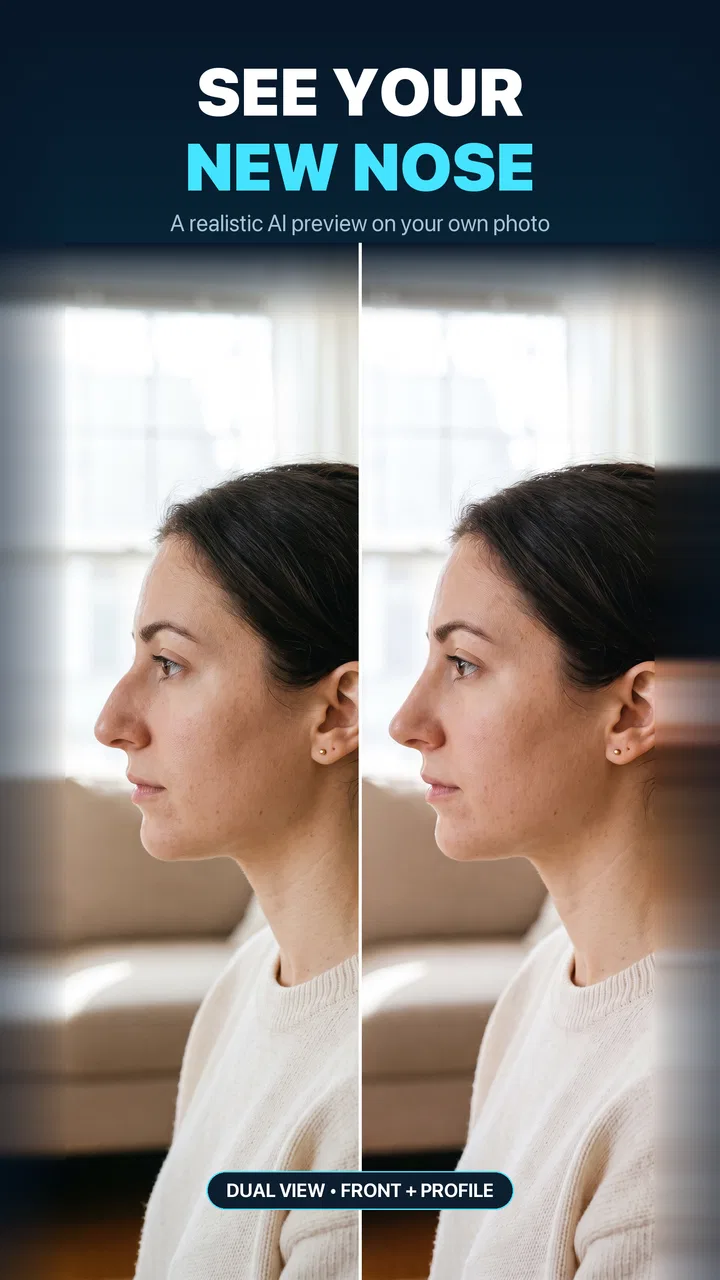
I approached Nose Job - Plastic Surgery AI as a decision tool rather than a beauty toy. Its purpose is simple: help you preview possible changes to facial features before you spend time discussing them elsewhere. The focus is on nose reshaping, while the store summary also points to lips, jawline, and broader face editing. That makes it interesting for anyone who wants a quick visual conversation starter, but it is important to understand what kind of answer an AI preview can and cannot provide.
In my experience, the app is most useful when I treat the result as a rough visualization, not a promise of how I would look after a real procedure. A face editor can show a direction, such as a straighter-looking bridge or a narrower-looking tip, but it cannot replace an examination by a qualified professional. That distinction shapes almost every part of the experience: the app is convenient, private enough for a casual preview, and easy to approach, yet its value depends heavily on how carefully I interpret the image.
How I would decide whether this app is right for me
The first question is not whether the app can make an attractive edit. Most visual editors can do that. The better question is whether I need a focused way to compare possible facial changes on my own photos. If I am simply looking for filters, makeup effects, lighting adjustments, or a general portrait editor, a broader beauty app may be a better fit. If I specifically want to think through a possible nose job or compare changes to my lips and jawline, this app has a clearer purpose.
You May Also Like

 AccuWeather: Weather Radar
AccuWeather Review: A Quick, Clear Forecast for Everyday Decisions
For everyday plans, the best forecast is the one you can understand quickly. AccuWeather makes rain timing, radar, and local conditions easy to act on, with a few trade-offs.

 Hill Climb Racing
Why Hill Climb Racing Still Turns Crashes Into One More Run
A tiny car, a bumpy hill and one more upgrade: Hill Climb Racing keeps resurfacing because its simple chaos makes every near-miss feel personal.

 AliExpress - Shopping App
AliExpress Makes Global Shopping Feel Personal, but Shoppers Bear the Risk
AliExpress turns a global marketplace into a pocket-sized discovery engine. Its reach is useful, its shopping loop compelling, and its trade-offs easy to miss.

 Lords Mobile: Kingdom Wars
Lords Mobile Is a Kingdom-Building Routine, Not a Quick Match
A case-by-case verdict on the building, battles, device demands, and social commitments that make Lords Mobile rewarding for some players and exhausting for others.

 PDF Scanner app - TapScanner
TapScanner Makes Paperwork Easier to Capture, Check, and Share
TapScanner makes scanning with a phone feel less like a rescue operation and more like a dependable step in getting work done. Its capture tools are useful, though not flawless.

 Block Blast!
 Shows How Much a Puzzle Game Can Leave Out
A quiet grid game shows why puzzle players increasingly value instant clarity, repeatable skill and low-pressure play—and where the genre still needs to catch up.
More From Our News Desk
View All News


I would also consider how seriously I plan to use the result. Someone who is curious about a cosmetic consultation may find a before-and-after preview helpful for explaining a preference. Someone expecting the app to predict a surgical outcome will probably be disappointed. Facial structure, skin, camera angle, expression, lighting, and the exact technique used by a surgeon all affect the final result. An edited image compresses those variables into a single visual impression.
That makes the app especially suitable for early-stage thinking. I can use it to notice what kind of change catches my eye, then bring that observation into a real conversation. I would not use it to choose a surgeon, decide that a procedure is medically appropriate, or judge whether a particular result is guaranteed. The distinction is practical: the app can help me form a question, but it cannot answer the clinical part of that question.
The app belongs to the Beauty category and comes from ALICAN TILKI. It is free to install, with optional purchases ranging from $9.99 to $99.99 per item. That pricing detail matters because the initial download does not automatically mean every editing capability is available without payment. I would explore the basic experience first and only consider spending money if the preview quality and controls genuinely help with my decision.
It is rated for Everyone, which makes the presentation approachable rather than intimidating. Still, an Everyone age label should not be confused with medical guidance. Younger users may be able to open and use a beauty editor, but conversations about elective procedures require a much more mature understanding of health, expectations, and consent. I would be particularly careful about treating edited images as standards for appearance.
What I look for during the first session
My first test would be deliberately controlled. I would choose a clear, front-facing photo with a neutral expression, even lighting, and the face positioned close to the center. This is not just about getting a prettier result. It gives the editor a more stable starting point and makes it easier to compare changes without confusing a tilted head or dramatic shadow with a change in facial structure.
After that, I would make one adjustment at a time. If I change the nose, lips, jawline, and overall face shape together, I lose the ability to understand which edit is actually influencing my reaction. A useful workflow is to save or note a restrained version, then compare it with a more noticeable version. The gap between those two can reveal whether I prefer a subtle refinement or whether I am reacting mainly to the novelty of seeing a transformed portrait.
Another useful habit is to check the image at normal size instead of relying only on a zoomed-in face. A nose may look balanced when enlarged but disproportionate when viewed as part of the whole head. I would also look at the eyes, cheeks, mouth, and chin after every change. Face editing can create a result that seems convincing in one area while making the surrounding proportions feel unnatural.
The most valuable result is often not the most dramatic result. A restrained preview can give me a clearer idea of what I actually want to discuss, while an extreme edit may only show what the software can exaggerate. This is one of the main trade-offs with AI-assisted beauty tools: stronger transformations are visually obvious, but subtle transformations are usually more useful for real decision-making.
Where the focused editing approach works best
The strongest part of the app is its narrow purpose. Instead of making me search through a large collection of unrelated filters, it places attention on facial changes that people commonly consider when thinking about cosmetic treatment. The nose is the central subject, but the inclusion of lips and jawline makes it possible to consider how one feature affects the impression of another.
That relationship is easy to overlook. I might begin by thinking that I want a smaller-looking nose, then discover that the balance of the lips or jawline changes how I perceive the whole face. A focused editor can be useful here because it encourages comparison rather than isolating one feature completely. I would still avoid reading the preview as an anatomical plan, but it can help me describe my aesthetic preference more accurately.
A realistic everyday use case would be preparing for a consultation. Before an appointment, I could test a few conservative variations and write down what I liked or disliked about each one. I might realize that I prefer a straighter profile rather than a smaller nose, or that a subtle lip adjustment changes the overall balance more than expected. Taking those observations into a consultation would be more useful than arriving with a vague request such as “make it better.”
The app can also help when discussing an idea with a trusted friend or family member. A picture gives the conversation something concrete to react to, although I would be careful not to let another person’s preference override my own. Beauty decisions are personal, and a friend’s enthusiasm for a dramatic edit does not make that edit suitable for my face or circumstances.
Another non-obvious use is using several photos rather than trusting one. A single angle can flatter or distort a feature. If I have suitable images from the front and a modest three-quarter angle, I can look for patterns in my reaction. If I like an edit only in one photograph, that tells me the result may depend on the camera position rather than reflecting a consistent preference.
I would also keep the original photo beside every edited version. This prevents the familiar face from becoming a moving target. After looking at several edits, it is easy to forget what changed and start judging each image against the previous edit instead of against the original. A simple side-by-side comparison makes the process less impulsive.
Why the AI preview is convenient
The appeal of an AI-based editor is speed. I do not need to arrange a photo session or learn complicated retouching tools before exploring an idea. For a first look, that simplicity is valuable. It lowers the effort required to move from curiosity to a visual example, which is exactly where many people get stuck.
It also gives me a way to test language. Terms such as “refined,” “balanced,” “less prominent,” or “more defined” can mean different things to different people. Seeing an edited image helps translate those words into something more specific. Even if the preview is not clinically exact, it can improve the conversation by showing the direction I have in mind.
The current version is 1.3.5, and the app supports devices running Android 7.0 or later. That broad compatibility makes it accessible on many older Android phones, though the quality of the experience can still depend on the phone’s camera, display, and general performance. I would judge it on the device I actually plan to use rather than assuming that a preview seen elsewhere will look identical.
The app has passed the early discovery stage with over 10 thousand installs and holds a 4.2 average from around 135 ratings. I see that as a sign that the concept has attracted real interest, but not as proof that every photo will produce a convincing result. A rating summarizes many users’ reactions; it does not tell me how well the editor handles my particular face, lighting, or preferred degree of change.
Where the result needs careful interpretation
AI editing can make a face appear smoother, more symmetrical, or more conventionally shaped even when the requested change is supposed to concern only one feature. That can make the final image feel better without telling me why. When reviewing a result, I would ask whether I like the intended nose, lip, or jawline change, or whether I simply like the broader polished appearance.
Facial expressions are another source of confusion. A smile can widen the nose, alter the lips, and change the jawline at the same time. If I compare an edited neutral photo with an unedited smiling photo, I am not conducting a fair comparison. Repeating the process with consistent expressions is a small step, but it makes the result much easier to evaluate.
I would also resist the temptation to make an edit match a celebrity image or a heavily filtered social-media portrait. Those references often involve different lenses, lighting, makeup, posing, and image processing. The app may help me explore a general direction, but it should not encourage the idea that one borrowed facial template will suit everyone.
Privacy is part of the decision as well. Any time I use a personal face photo in an app, I should read the permissions and privacy information shown on my device and in the relevant store materials before uploading sensitive images. I would avoid using photos that include other people without their permission, and I would remove images from the app or device when appropriate. This is sensible practice for any face editor, especially one used for intimate appearance decisions.
When a different type of app may be a better choice
The main alternative is a general photo editor. That option is better when I want control over brightness, cropping, blemish removal, makeup, hair, background, and facial adjustments in one place. A broad editor may offer more creative freedom, but it can also make the specific question harder to isolate. I may spend time polishing the entire portrait without learning what I actually think about a particular facial change.
Makeup-focused apps are a better match for temporary appearance experiments. If my goal is to see how contouring, lipstick, or shading changes the impression of my nose or jawline, makeup simulation may be more relevant than a surgical-style preview. It also reflects a reversible choice. The trade-off is that makeup cannot represent structural changes accurately, so it answers a different question.
Camera filters are useful for casual social images, but I would not choose them for serious comparison. Filters often prioritize an attractive, instantly recognizable look over a controlled before-and-after. They can be fun, yet they may smooth, reshape, and relight the face at once. For a thoughtful decision, that lack of separation is a weakness.
A consultation with a qualified medical professional is the better alternative when I am already considering a real procedure. A specialist can discuss anatomy, breathing, proportion, limitations, recovery, risks, and realistic outcomes. This app can help me prepare questions, but it cannot provide those forms of guidance. If the concern involves breathing, pain, injury, or a sudden change in appearance, I would skip cosmetic experimentation and seek appropriate medical advice.
There is also a psychological reason to choose a different path. If I notice myself repeatedly editing the same feature, feeling worse after every version, or comparing my face compulsively with idealized images, the app is no longer helping me make a calm decision. In that situation, taking a break is more valuable than finding a more convincing filter. A beauty editor should support reflection, not intensify distress.
How the cost changes the decision
Because the app is free to install but offers in-app items from $9.99 to $99.99, I would treat payment as a second decision rather than an automatic part of downloading. I would first establish whether the basic workflow is understandable, whether my photos are handled well, and whether the available preview is genuinely useful to me. Paying before answering those questions creates unnecessary pressure to justify the purchase.
The upper end of the purchase range is significant for an app whose output remains a visual approximation. I would compare the possible benefit with my actual goal. If I only want to satisfy a moment of curiosity, spending heavily would not make sense. If I am using the preview to organize questions for a consultation and the paid tools provide a meaningful improvement, the expense may feel more defensible, but I would still keep expectations modest.
There is a psychological cost to switching between many beauty apps too. Each editor may produce a different version of my face, and comparing them can become confusing rather than informative. Before moving to another tool, I would define what I need: a nose-focused preview, general retouching, makeup simulation, or professional advice. That simple definition prevents me from collecting edits without reaching a clearer conclusion.
I would save only a small set of meaningful comparisons, preferably the original plus a few restrained variations. Keeping dozens of increasingly dramatic versions can encourage endless tweaking. The goal is not to discover a mathematically perfect face; it is to understand my preference well enough to decide whether I want a further conversation outside the app.
My recommendation for different kinds of users
I recommend trying this app if you want a quick, focused way to visualize possible changes to your nose and related facial features. It is particularly useful for someone at the curiosity or preparation stage, before a consultation or a personal discussion. The best experience comes from controlled photos, small adjustments, and a willingness to treat the image as a conversation aid rather than a forecast.
I would recommend it less strongly to someone seeking a complete beauty studio. The app’s appeal is its facial-change focus, not the broad creative range of a full photo editor. If your priorities are makeup, lighting, backgrounds, hair, or social-media effects, another category will probably save you time.
I would also skip it as a decision-maker for surgery. No edited portrait can establish whether a procedure is safe, necessary, technically possible, or likely to produce a particular result. The responsible workflow is to use the preview, if at all, to clarify questions and then rely on a qualified professional for medical information.
My practical method would be straightforward: choose a neutral image, make one change at a time, compare subtle and stronger versions, repeat with another suitable angle, and keep the original visible. Then I would write down what I actually prefer and take those notes to the next conversation. This approach extracts the app’s useful value while limiting the risk of getting pulled into unrealistic perfection.
Overall, this is a focused Beauty app with a clear use case and an accessible starting point. Its free entry, Everyone rating, Android 7.0 support, and growing user interest make it easy to test, while the optional purchases mean I would examine the experience before paying. I like it most as a visual thinking tool: useful for forming a preference, not for making a medical decision. If that matches what you need, it is worth exploring carefully; if you want either professional certainty or a complete photo-editing suite, a different option will serve you better.
FAQs for Nose Job - Plastic Surgery AI
01What is Nose Job - Plastic Surgery AI, and how does it work?
Nose Job - Plastic Surgery AI is an image-editing app that lets you preview possible nose-shape changes using artificial intelligence and facial editing tools. After selecting or taking a photo, you can usually apply adjustments to the nose and compare the result with the original image. The output is a visual simulation for entertainment and planning—not a medically accurate prediction of surgical results.
02Is Nose Job - Plastic Surgery AI suitable for making real cosmetic surgery decisions?
The app can help users explore different aesthetic possibilities, but it should not be treated as a professional medical consultation. AI-generated edits may not reflect your facial structure, skin, healing process, or what a surgeon can realistically achieve. If you are considering rhinoplasty, use the images only as a conversation starter and consult a qualified, board-certified plastic surgeon for personalized advice.
03Does the app require a photo, and what type of image produces the best results?
Most features depend on uploading an existing portrait or taking a new selfie. For more convincing edits, use a clear, well-lit photo with your face looking directly at the camera, minimal makeup, and no sunglasses, filters, or objects covering your nose. Side or angled photos may produce less reliable results, and heavily compressed or blurry images can lead to unnatural-looking modifications.
04Is Nose Job - Plastic Surgery AI free to download and use?
The app may be available to download at no initial cost, but some editing tools, filters, exports, or advanced AI effects can be restricted behind advertisements, in-app purchases, or a subscription. Availability and pricing may vary between Android and iOS and can change over time. Before confirming a purchase or trial, review the store listing and subscription terms carefully.
05What should I know about privacy when uploading photos to the app?
Because the app processes personal facial images, privacy is an important consideration before using it. Check the current privacy policy to learn whether photos are processed on the device or uploaded to external servers, how long images are retained, and whether data is shared with service providers. Avoid uploading photos of other people without permission, and delete saved projects when they are no longer needed.
Pros
- AI previews can help users explore different nose-shape possibilities.
- Simple interface makes photo-based experimentation quick and accessible.
- Useful for discussing aesthetic preferences with a qualified surgeon.
- Virtual results can be saved or shared for personal comparison.
- Provides a low-risk way to visualize changes before a consultation.
Cons
- Results may look unrealistic depending on lighting
- angle
- or photo quality.
- AI previews should not be treated as medical advice or guaranteed outcomes.
- Uploading face photos may raise privacy and data-storage concerns.
- Some features or realistic previews may require payment or subscriptions.
- The app cannot assess breathing issues
- facial function
- or surgical risks.

Nose Job - Plastic Surgery AI
Gallery